
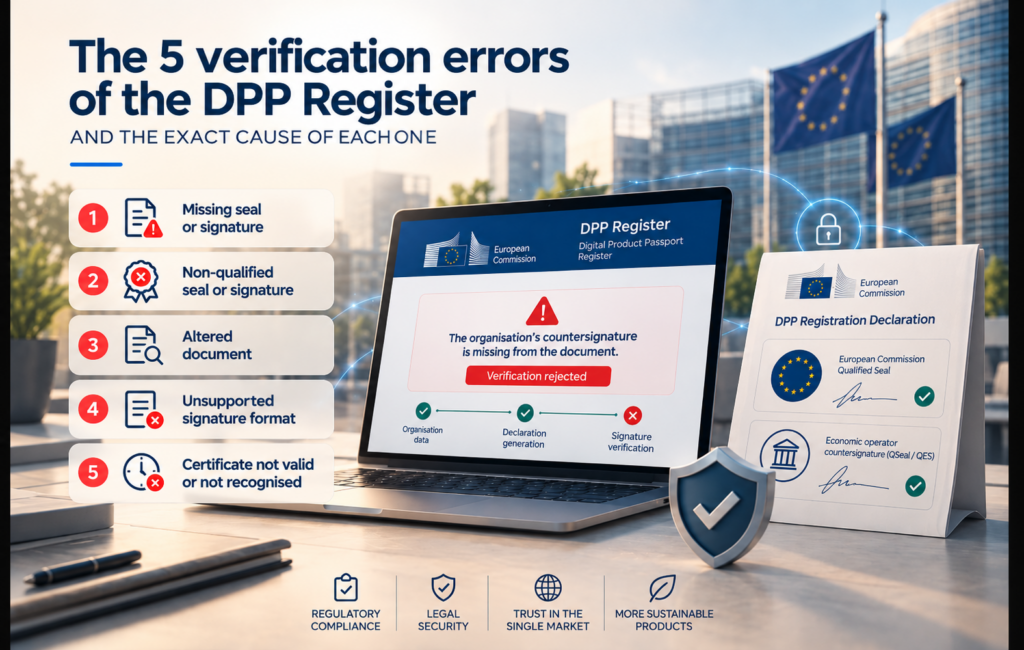
The 5 DPP Registry Verification Errors (and the Exact Cause of Each One)
Suscríbete:
If you are reading this, you have probably already seen an error message in English on the European Commission’s Central Digital Product Passport (DPP) Registry screen. You know what you need: to understand the exact cause and fix it right now.
The DPP Registry, operational since 19 July 2026, with its implementing provisions in force since 6 August 2026 (Commission Implementing Regulation (EU) 2026/1778), requires your organisation’s registration declaration to be validated through a dual-seal process. First, the Commission applies its institutional seal to the PDF generated by the system. The economic operator must then countersign or counterseal it using a qualified electronic seal (QSeal) or qualified electronic signature (QES) issued by a QTSP. If either of these two seals fails, verification is rejected.
Below, we explain the five actual errors returned by the system, including the exact messages in English as they appear in the Registry interface, according to the DPP Registry User Guide for Economic Operators published by DG GROW, their precise technical causes and how to resolve them.
EADTrust Service · DPP Do you need to resolve a verification error now? Contact EADTrust: we are a QTSP included in the EU Trusted List and issue QSealCs compatible with the DPP Registry. →Key Concepts Related to DPP Registry Verification
What are QcStatements?
QcStatements are standardised statements included in qualified electronic certificates that indicate certain characteristics of their qualified status. Validation systems can use this information to automatically determine the level and properties of the certificate used.
What is OCSP?
OCSP (Online Certificate Status Protocol) is a protocol used to check the status of an electronic certificate online. Among other things, it makes it possible to verify whether a certificate remains valid or has been revoked by its provider.
What is the semantic validation of a DPP?
Semantic validation checks whether the information included in a Digital Product Passport complies with the meaning, structure and relationship rules defined for that product’s data. It is performed in addition to other technical checks relating to the file format or the identifiers used.
Why Does the DPP Registry Require Two Signatures on the Same Document?
The organisation identity verification process in the DPP Registry consists of three sequential steps:
Step 1. The economic operator enters its details in the Registry form, including its legal name, NTR/EUID, country of establishment and address. The system automatically generates a PDF containing the registration declaration.
Step 2. The European Commission applies its own qualified institutional electronic seal to that PDF. At this stage, the document contains one signature: the Commission’s seal.
Step 3. The operator downloads the PDF already sealed by the Commission and, outside the system, countersigns or counterseals it using its own qualified electronic seal (QSeal, for a legal person) or qualified electronic signature (QES, for a natural person or self-employed individual), issued by a Qualified Trust Service Provider (QTSP). The operator then uploads the PDF back to the Registry.
The final uploaded document must contain exactly two signatures or seals: the Commission’s seal and the operator’s signature or seal. Verification will fail if either is missing, if there are more than two, if either is not qualified, or if the document was altered between steps 2 and 3.
The required signature format is PAdES Baseline at B, T, LT or LTA level. Any other format, including XAdES, CAdES or ASiC containers, will be automatically rejected.
The Five Organisation Seal or Signature Verification Errors
These are the errors returned by the system when something goes wrong with the economic operator’s countersignature or counterseal. We have grouped them by root cause, as each error requires a different solution.
Error 1 – The Seal or Signature Is Missing from the Document
System messages:
“The organisation’s countersignature or counterseal is missing from the document.”
“The document does not contain the required number of signatures. Exactly two signatures are expected: the Commission institutional seal and the organisation’s countersignature or counterseal.”
Exact cause:
The operator uploaded the PDF without countersigning or countersealing it. Alternatively, the operator may have correctly downloaded the document sealed by the Commission but uploaded it again without adding their own signature, or uploaded an earlier version of the file, such as the draft created before the Commission applied its seal.
In both cases, the system detects only one signature, or none at all, when it expects exactly two.
How to resolve it:
Download the PDF sealed by the Commission again directly from the Registry. Before uploading it, apply your qualified electronic seal (QSealC) if you are a legal person or sign it using your qualified electronic signature (QES) if you are a natural person.
Use a tool that generates a PAdES Baseline signature at B, T, LT or LTA level. If you do not have a QSealC, a QTSP such as EADTrust can issue one and guide you through the sealing process so that the document contains the two required signatures.
Error 2 – The Seal or Signature Does Not Meet the Qualified Level
System messages:
“The organisation’s seal does not meet the required Qualified Electronic Seal (QSeal) level. Legal persons must use a qualified electronic seal.”
“The organisation’s signature does not meet the required Qualified Electronic Signature (QES) level. Natural persons must use a qualified electronic signature.”
“The required qualification level for the organisation’s signature or seal could not be determined.”
Exact cause:
An advanced rather than qualified electronic seal or signature has been used, or the operator has used an SSL/TLS server certificate, a self-signed certificate or a certificate whose qualification level cannot be confirmed by the system through the EU Trusted Lists.
Regulation (EU) 2026/1778 expressly requires a qualified electronic seal for legal persons and a qualified electronic signature for natural persons. No intermediate level is accepted.
How to resolve it:
You need a qualified electronic seal certificate (QSealC) or a qualified electronic signature (QES) issued by a QTSP included in the EU Trusted List.
Qualified certificates contain the QcStatements extensions (OID 0.4.0.1862.1), which allow any verification system to identify their qualified status unambiguously. As a QTSP included in the Spanish Trusted List, EADTrust issues QSealCs containing these extensions, which can be automatically verified by the DPP Registry.
Error 3 – The Certificate Details Do Not Match the Organisation Details
System message:
“The information specified in the electronic signature or seal does not match the information provided in the organisation details.”
Exact cause:
The identification fields in the qualified certificate, such as the legal name, NTR/EUID in the OrganizationIdentifier field and country of establishment, do not exactly match the information entered in the organisation registration form.
The most common discrepancies include:
- Typographical differences in the legal name, including abbreviations, special characters or different use of capital letters.
- Use of a certificate issued to a subsidiary or a different legal entity.
- A change of legal name after the certificate was issued, meaning that the certificate still contains the previous name.
- An NTR/EUID that is missing from the certificate or differs from the one entered in the form.
How to resolve it:
Before issuing or renewing a qualified certificate, the QTSP must verify the organisation’s current registration details by consulting the relevant commercial register or equivalent source.
The certificate’s OrganizationIdentifier field must include the exact NTR or EUID that will be entered in the DPP Registry form. EADTrust performs this preliminary check of registration details as part of its issuance process specifically to prevent this error, which is the most common in practice.
Error 4 – Incorrect Signature Format: Not PAdES Baseline
System message:
“The organisation’s signature or seal does not conform to the required PAdES Baseline signature format (B, T, LT, or LTA level). For more details please check the DPP Registry User Guide for Economic Operators.”
Exact cause:
The PDF was signed or sealed using a format other than PAdES Baseline.
This frequently happens when public-administration signing tools, such as AutoFirma in Spain, are used with their default settings. These tools may generate XAdES, CAdES or ASiC-S/ASiC-E containers instead of a PAdES signature embedded in the PDF.
It may also occur when the tool generates a PAdES profile that is not Baseline, such as a legacy PAdES-BES profile predating ETSI EN 319 142.
How to resolve it:
Use a sealing tool that applies PAdES Baseline directly to the PDF at B, T, LT or LTA level.
Do not sign the file in another format and then convert it, as doing so may invalidate the Commission’s existing signature. A QTSP such as EADTrust provides remote sealing tools that directly generate the correct PAdES Baseline format, eliminating this error at its source.
Error 5 – The Certificate Is Untrusted, Revoked or Its Validation Is Indeterminate
System messages:
“The certificate used for the organisation’s signature or seal is not trusted, has been revoked, or could not be verified against a trusted certificate authority.”
“The organisation’s countersignature or counterseal is present but could not be validated.”
“The organisation’s signature or seal validation did not pass. The signature status is invalid or could not be determined.”
Exact cause:
One of the following situations has occurred:
- The qualified certificate expired before the sealing operation or before verification.
- The certificate was revoked and appears on the provider’s CRL, or the OCSP response returns the status “revoked”.
- The certificate’s trust chain cannot be built up to a trusted root authority recognised in the European Trusted Lists.
- The issuing provider’s OCSP or CRL services were unavailable when the Registry attempted verification, preventing it from confirming the certificate’s status.
How to resolve it:
Check that your certificate is still valid before every sealing operation. If it has expired or been revoked, you will need a new certificate.
If the problem concerns the trust chain, verify that your QTSP is included in the EU Trusted List and that its root and intermediate certificates are published in the relevant TSLs.
EADTrust maintains high-availability OCSP and CRL services, with redundancy and optimised response times, so that the DPP Registry can verify the certificate’s status without disruption.
Commission Seal Errors: Why You Must Restart the Process Instead of Contacting Your QTSP
A second category of verification errors is unrelated to your seal or certificate. These errors appear when the system detects a problem with the Commission’s institutional seal that should be present in the document.
They all have the same underlying cause: the PDF you uploaded is not the unmodified original document generated and sealed by the Commission.
Messages included in this category:
“The Commission institutional seal is missing from the document.”
“The countersigned document does not match the original declaration sealed by the Commission. This may indicate that the document was altered after the Commission seal was applied, or that a different document was signed instead of the one provided. The countersignature or counterseal must be applied to the original sealed declaration without any modifications.”
“The Commission institutional seal is present but could not be validated. Please restart the verification process.”
“The identity contained in the Commission seal does not match the expected identity. Please restart the verification process.”
“The Commission seal does not meet the required Qualified Electronic Seal (QSeal) level. Please restart the verification process.”
“The qualification level of the Commission seal could not be determined. Please restart the verification process.”
“The Commission seal does not conform to the required PAdES Baseline signature format (B, T, LT, or LTA level). Please restart the verification process.”
“The Commission seal validation did not pass. The seal status is invalid or could not be determined. Please restart the verification process.”
“The certificate used for the Commission seal is not trusted, has been revoked, or could not be verified against a trusted certificate authority. Please restart the verification process.”
Common cause:
The document was altered after the Commission applied its seal. It may have been opened in a PDF editor that modified its metadata, printed and rescanned, converted into another format and then converted back, or had its PDF layers flattened.
The operator may also have signed a different file from the one downloaded from the Registry, or a technical issue may have occurred while the original PDF was being generated or downloaded.
Solution:
Unlike the previous five errors, these issues cannot be resolved by your QTSP. You must:
- Restart the verification process from the PDF-generation stage in the Registry.
- Download the new PDF sealed by the Commission without opening, editing, printing or converting it.
- Apply your QSeal or QES directly using the PAdES Baseline format.
- Upload it to the Registry immediately.
If the error persists after restarting the process, it may be caused by a temporary incident affecting the Commission’s service.
The message itself recommends “Please restart the verification process” because the Commission recognises that this category of errors is resolved by regenerating the document, rather than by changing the operator’s certificate.
Other Common Errors: Forms, Registration Files and Semantic Validation
Organisation Data Form Errors
“Some required information is missing. Please review the highlighted fields.”
“Some values do not match expected formats. Please review the highlighted fields.”
These errors appear during the initial data-entry stage, before any certificate is involved.
They can be resolved by reviewing the fields highlighted in the form. Common causes include empty mandatory fields, an incorrectly formatted NTR/EUID (which must follow an ETSI format such as NTRES-A12345678) or unsupported characters in the address.
They do not require intervention from a QTSP.
Errors When Uploading the Digital Passport XML/JSON File
“The file exceeds the maximum allowed size of 1 GB.”
“The file name contains unsupported characters.”
“Invalid URL format. Enter a URL starting with https://.”
These are technical file-format errors. They can be resolved by reducing the file size, removing special characters from the filename or correcting the data carrier URL so that it begins with https://.
They are unrelated to certificates or identity verification.
Registry Validation Errors in the Activity Dashboard
“The submitted file does not conform to the required schema.”
“The same unique identifier has been used for more than one DPP in the same registration request.”
“The UPI URL is invalid.”
“The submitted file exceeds the maximum of 100 registration requests.”
“Semantic validation failed due to its unavailability.”
“The system is unable to process your request at this time. Please try again later.”
These errors appear after identity verification, during the actual Digital Product Passport registration stage.
They relate to data-structure issues, such as an incorrect XML/JSON schema, duplicated identifiers or malformed URLs; system limits, such as the maximum of 100 registration requests per file; or the temporary unavailability of the semantic validation service.
They are unrelated to the operator’s qualified certificate.
Important Notice: Battery DPP Registration Cannot Yet Be Completed
This is an important operational note, not a certificate error. According to the DPP Registry User Guide for Economic Operators, successful registration of battery Digital Product Passports is not currently available because the semantic catalogue for this product group has not yet been formally defined.
This means that although organisation identity verification using a QSeal or QES has been fully operational since July 2026, the actual registration of a battery DPP cannot yet be successfully completed due to this technical limitation.
If you successfully verify your identity but receive an error when attempting to register a battery passport, the problem does not lie with your certificate or signature. It is a temporary system limitation that will be resolved when the battery-specific semantic catalogue is published.
The mandatory implementation date for the battery passport remains 18 February 2027, in accordance with Article 77 of Regulation (EU) 2023/1542.
The recommended course of action is to complete your organisation’s identity verification now so that the DPP can be registered without delay once the semantic catalogue becomes available.
Frequently Asked Questions
Restart the verification process in the Registry so that it generates a new PDF containing a fresh institutional seal.
Do not open, edit, print or convert the PDF before countersealing it. If the error continues after several attempts, it may be caused by a temporary service incident. Wait and try again later.
An SSL/TLS certificate identifies a web server, not a legal person. It is not a qualified electronic seal under the eIDAS Regulation.
It is not issued by a QTSP in its capacity as a qualified trust service provider, it is not listed in the EU Trusted List as a qualified electronic seal service, and it does not contain the QcStatements extensions that identify its qualified level.
The DPP Registry expressly requires a QSeal at qualified level, not a website authentication certificate.
No. Once an organisation obtains “verified economic operator” status, it can register all the DPPs it needs without repeating the identity-verification process.
Verified status remains valid until the electronic identification method used expires and, in any event, for a maximum period of three years from the date of verification. Once this period has elapsed, verification must be repeated.
This depends on the provider and the complexity of verifying the applicant’s identity.
At EADTrust, once the registration details have been validated and all required documentation has been received, a qualified electronic seal certificate can be issued within a short period.
The limiting factor is usually the verification of the organisation’s details against the relevant commercial register or equivalent source, rather than the technical issuance process.
Yes. A qualified electronic seal certificate issued by a QTSP included in the EU Trusted List is valid for both registries.
Regulation (EU) 2026/1778 expressly provides for avoiding duplicate verification when the DPP Registry is integrated with systems such as EPREL that use the same level of verification.
EADTrust’s QSealC is already compatible with both EPREL and the DPP Registry, so separate certificates are not required.
EADTrust: Resolve Your Verification Error with a QTSP Included in the EU Trusted List
EADTrust is a Qualified Trust Service Provider (QTSP) included in the EU Trusted List and supervised by Spain’s Ministry of Economic Affairs and Digital Transformation.
Our qualified electronic seal certificates (QSealCs) and qualified electronic signatures (QESs) are designed to pass the DPP Registry verification process without incident.
EADTrust provides the following safeguards against DPP Registry verification errors:
- Verifiable qualified-level QSealCs and QESs: These include QcStatements extensions that the DPP Registry automatically recognises as qualified, resolving Error 2.
- Preliminary verification of registration details: We check that the legal name, NTR/EUID and country of establishment in the certificate exactly match the details that will be entered in the Registry form, resolving Error 3.
- PAdES Baseline sealing tools: Our remote sealing service directly generates signatures in the required format and at the required level, without compatibility risks, resolving Error 4.
- High-availability OCSP and CRL services: These allow the DPP Registry to verify your certificate’s status at any time without validation errors, resolving Error 5.



19 de October de 2026
19 de October de 2026